AI Analytics for Support: From Fast Answers to Fewer Questions
AI shouldn’t stop at answering tickets. The same question-and-answer logs can surface trends, training gaps, and usability issues—if you analyze them the right way.
Originally posted on YouTube on June 22, 2023Key takeaways
- AI’s first value is fast, usable answers, but its second value is analytics that reveal trends across interactions.
- Analyzing Q&A logs can expose common topics, training gaps, and usability issues without complex prompts.
- The operational goal is fewer repeated questions through upstream fixes, not just faster ticket responses.
Most teams first meet AI as a question-and-answer machine: type a prompt, get a response. That’s useful, and it’s where a lot of the conversation is stuck.
But inside an organization, the bigger payoff often comes after the answer is delivered—when you treat AI interactions as operational data.
The two jobs AI should be doing
James Moelk frames AI’s value as “twofold.” First, it helps individuals get unstuck and move faster.
“People will ask a question and get a response. Super powerful. It’s great for giving you a list of ideas.”
That applies to personal productivity (drafting, brainstorming, outlining) and it applies at work: a support tech, salesperson, or new hire asks a technical question and gets a usable response quickly.
The second job is the one most teams ignore: AI can summarize what’s happening across hundreds or thousands of those interactions and turn it into management-grade signal.
Secure, internal Q&A is table stakes
If you’re serious about using AI with real customer and operational data, you need to start with containment. IntelliChat’s model is simple: ingest a company’s data and let users ask questions about that data specifically—without sending it out into the open.
That matters in multi-tenant environments where the wrong configuration becomes a data leak, and it matters for regulated industries where “we didn’t mean to share it” doesn’t go far.
You can’t build trustworthy analytics on top of an untrustworthy data flow.
Turn Q&A logs into operational analytics
Once you have secure internal Q&A, your question-and-answer history becomes a high-quality dataset about what people can’t find, don’t understand, or keep getting wrong.
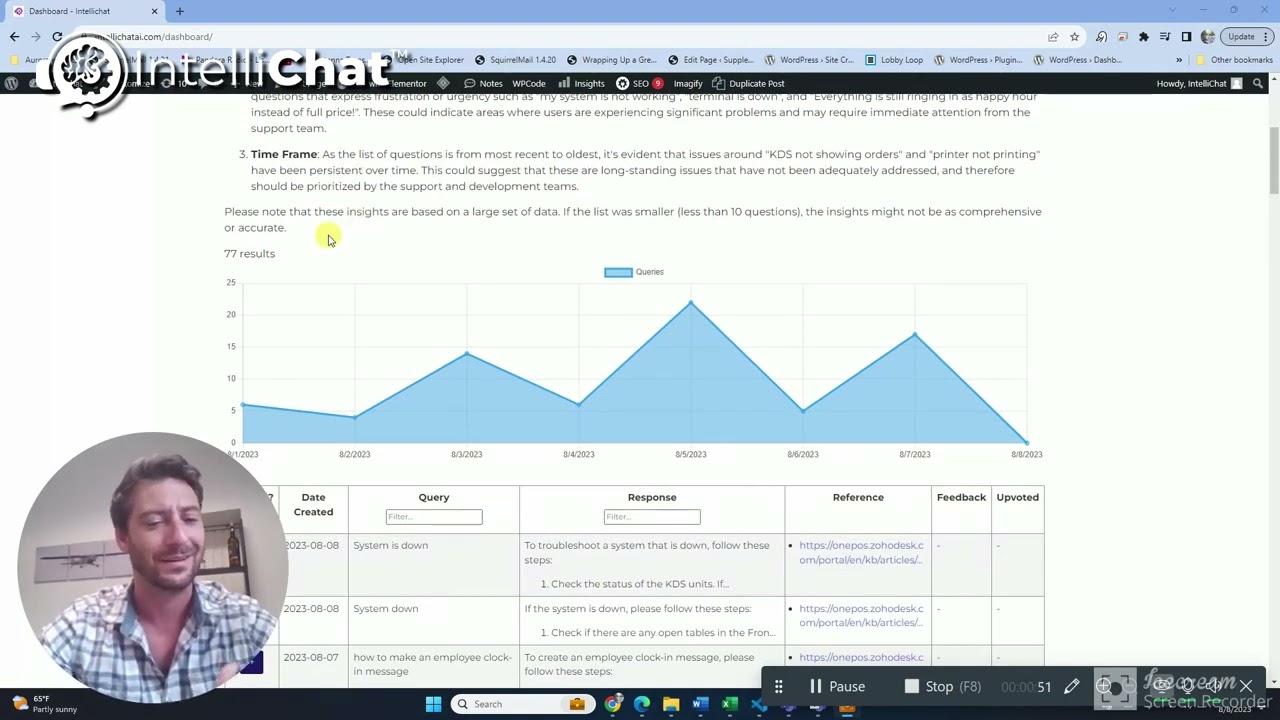
Moelk describes taking a set of questions and responses and feeding it back into the AI with a straightforward prompt: what insights would help improve support in the future?
“I really didn’t feed it that much… The prompt was… simple.”
The output he got was the kind of analysis support and ops leaders usually assemble manually:
- Common topics: the most frequent queries, grouped into themes rather than one-off keywords.
- Training needs: repeated confusion that suggests onboarding gaps, missing SOPs, or docs that are present but unusable.
- System usability issues: patterns that point to friction in the product or tooling—places where users are forced to ask for help because the system doesn’t guide them.
This is where “AI for support” moves from reactive help to proactive improvement.
The goal isn’t faster answers—it’s fewer questions
Fast answers are good. Fewer questions is better.
When you can identify bottlenecks and pain points, you can fix the upstream causes: unclear workflows, incomplete documentation, broken UX paths, or training that assumes too much context.
That reduces ticket volume, improves first-contact resolution, and makes your team less dependent on heroics. It also gives execs something they can act on: trends, not anecdotes.
What this means for you
If you’re evaluating AI, don’t stop at “does it answer correctly?” Ask what it can tell you about your operation over time. The most practical systems will support secure internal Q&A and analytics that surface what to fix next—so your team spends less time answering the same questions and more time removing the reasons they get asked.